
Fold Craft Launcher – Minecraft Java Edition on Android
Fold Craft Launcher lets you run Minecraft Java Edition on Android. Learn how to download, install, and set up mods, shaders, and more on your phone.

Fold Craft Launcher is a free, open source Android application that lets you run the actual Java Edition of Minecraft on your phone or tablet instead of the separate Bedrock version most mobile players are stuck with. It works by bundling a Java runtime and a compatibility layer directly into the app, so the same mods, resource packs, and shaders that PC players use on Java Edition can also run on a touchscreen device. If you have ever wanted Forge or Fabric mods on your phone, this is one of the tools built specifically for that.
Key Takeaways
- Fold Craft Launcher runs true Minecraft Java Edition on Android, not the limited Bedrock version.
- It supports popular mod loaders including Forge, Fabric, and Quilt, along with OptiFine and many shader packs.
- The app is free, open source, and does not include the game itself. You still need a legal copy of Minecraft Java Edition.
- Performance depends heavily on your device’s RAM, chipset, and available storage.
- Touch controls are customizable, and external controller support is available for a more traditional feel.
What Is Fold Craft Launcher
Fold Craft Launcher is a mobile launcher built to bring the full Java Edition experience of Minecraft to Android devices. Regular mobile Minecraft players are usually locked into Bedrock Edition, which has a smaller mod ecosystem and different technical limitations compared to Java Edition. Fold Craft Launcher solves that gap by packaging a Java virtual machine, graphics translation layer, and touch-friendly control system into a single APK.
In plain terms, it takes the same game files, mods, and shaders that a PC player would install and makes them work on a phone screen with on-screen buttons for movement, inventory, and building.
This matters because Java Edition has historically had a much larger and more mature modding community than Bedrock. Players who want survival overhauls, technical mods like create or tech-based automation packs, or visual shader packs like Complementary or BSL have almost no equivalent on Bedrock. Fold Craft Launcher opens that entire library up to mobile users.
How Fold Craft Launcher Works
Under the hood, Fold Craft Launcher relies on a few core components working together.
Java Runtime Environment (JRE)
Since Minecraft Java Edition is written in Java, the launcher bundles a mobile-compatible JRE so the game can actually execute on Android hardware, which normally does not run desktop Java applications natively.
Graphics Translation Layer
Java Edition renders using OpenGL, which is not natively supported the same way on most Android GPUs. The launcher translates OpenGL calls into a format the device’s graphics hardware can process, similar to how other Java-on-Android projects handle rendering.
Touch Control Overlay
On top of the game itself, the launcher adds a customizable control scheme: virtual joysticks, action buttons, and gesture-based camera movement, all of which can be resized and repositioned to fit different hand sizes and screen layouts.
Mod and Version Management
The app includes a built-in interface for downloading different Minecraft versions, installing mod loaders, and managing resource packs and shader packs without needing a separate file manager or PC.
Key Features
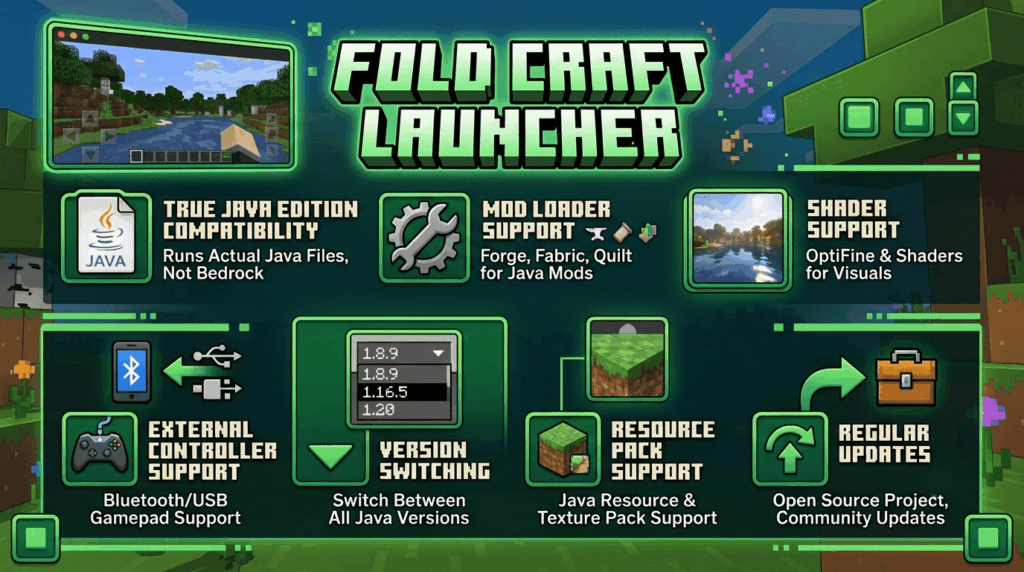
- True Java Edition compatibility – runs actual Java Edition game files, not a Bedrock imitation.
- Mod loader support – Forge, Fabric, and Quilt are supported, covering the vast majority of popular Java mods.
- Shader support – OptiFine and several standalone shader packs can be installed for improved lighting, water, and shadow effects.
- Customizable controls – on-screen button layout, sensitivity, and joystick size can all be adjusted.
- External controller support – Bluetooth and USB controllers can be mapped for a more console-like feel.
- Version switching – install and switch between different Minecraft versions without reinstalling the app.
- Resource pack support – texture packs designed for Java Edition work as expected.
- Regular community updates – as an actively maintained open source project, compatibility improvements and bug fixes are released periodically.
System Requirements
Because it is essentially running a desktop version of a game on mobile hardware, device specs matter a lot more here than with typical mobile games.
| Requirement | Minimum | Recommended |
|---|---|---|
| Android Version | 8.0 or higher | 10.0 or higher |
| RAM | 3GB | 6GB or more |
| Storage | 1GB free | 4GB or more (for mods and worlds) |
| Processor | Mid-range chipset | Snapdragon 700 series or equivalent |
| GPU | Adreno/Mali with OpenGL ES support | Newer generation Adreno/Mali |
Older or budget devices can still run vanilla Java Edition at lower settings, but heavily modded setups with shaders will need stronger hardware to maintain playable frame rates.
Download Fold Craft Launcher
How to Download and Install Fold Craft Launcher
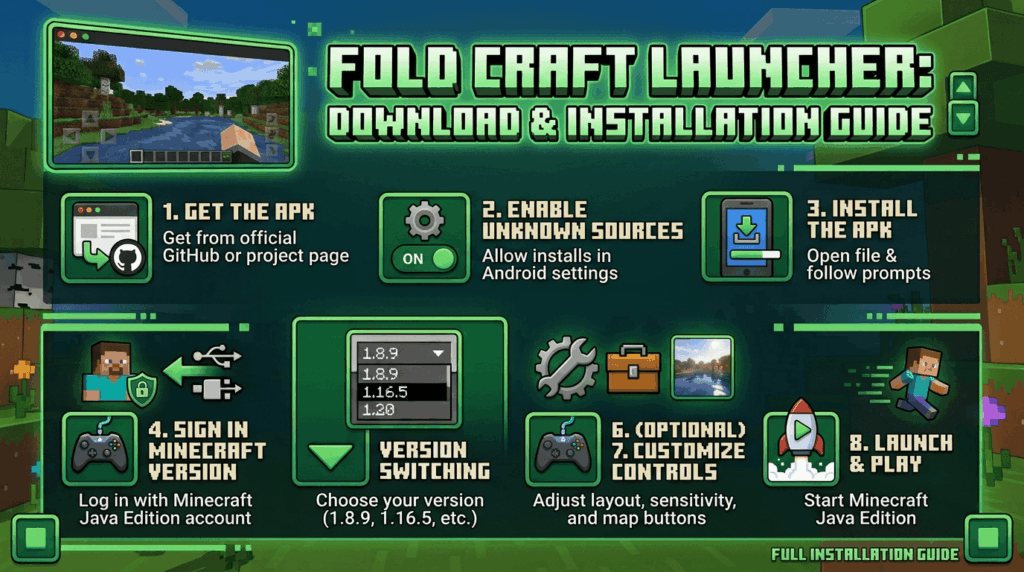
- Get the APK from a trusted source. Since Fold Craft Launcher is not distributed through the Google Play Store, it needs to be downloaded as an APK file from the official project page or GitHub repository.
- Enable installation from unknown sources. In your Android settings, allow app installs from the browser or file manager you used to download the APK.
- Install the APK. Open the downloaded file and follow the on-screen prompts to complete installation.
- Launch the app and sign in. You will need a valid Minecraft Java Edition account to log in and access your purchased game files.
- Select a Minecraft version. Choose the version you want to play from the built-in version manager.
- Install mods or shaders (optional). Use the in-app mod browser or manually add mod files to the appropriate folder if you want a modded experience.
- Adjust control settings. Customize button placement and sensitivity before jumping into a world.
- Launch the game. Once everything is configured, start Minecraft directly from the launcher.
Fold Craft Launcher vs Bedrock Edition
| Aspect | Fold Craft Launcher (Java) | Bedrock Edition (Mobile) |
|---|---|---|
| Mod support | Forge, Fabric, Quilt, huge mod library | Add-ons only, much smaller ecosystem |
| Shaders | OptiFine and standalone shader packs | Limited, RTX-style visuals on select devices only |
| Performance | Depends on device, generally heavier | Optimized specifically for mobile |
| Cross-play | Only with other Java players | Cross-play across Xbox, PC Bedrock, PlayStation, Switch, mobile |
| Setup complexity | Requires manual APK install and configuration | Installs directly from app store |
| Official support | Community maintained, not affiliated with Mojang | Fully supported by Mojang |
Neither option is strictly better. Bedrock is smoother to set up and plays well with friends on other platforms, while Fold Craft Launcher opens the door to the deeper Java modding scene at the cost of a more involved setup.
Common Mistakes to Avoid
- Downloading from unofficial mirror sites. Always verify you are getting the APK from the legitimate project source to avoid modified or unsafe files.
- Ignoring RAM allocation settings. Many performance issues come from the app not being given enough memory in its settings menu.
- Installing too many mods at once. Adding several mods together without testing can cause crashes; it’s better to add a few at a time and confirm stability.
- Skipping storage cleanup. Worlds, mods, and resource packs add up quickly, so keeping an eye on free storage prevents slowdowns and failed downloads.
- Using an outdated version of the launcher. Older builds may have compatibility issues with newer Minecraft versions or mod loaders.
Troubleshooting Tips
Game won’t launch or crashes immediately Check that your device meets the minimum RAM requirement and try lowering the allocated memory in the launcher’s settings if it’s set too high for your device.
Low frame rate or stuttering Reduce render distance, disable heavy shader packs, and lower resolution scaling in the video settings menu.
Mods not loading Confirm the mod version matches your selected Minecraft version and mod loader version exactly, since mismatched versions are the most common cause of mods failing silently.
Controls feel unresponsive Adjust joystick dead zone and sensitivity in the control settings, and consider pairing a Bluetooth controller for more precise movement.
Login issues Make sure you are using a genuine Minecraft Java Edition account, and check your internet connection since authentication requires a live connection to Mojang’s servers.
Frequently Asked Questions (FAQs)
Is Fold Craft Launcher free to use?
Yes, the launcher itself is free and open source. However, you still need to own a legitimate copy of Minecraft Java Edition to log in and play.
Is Fold Craft Launcher safe to install?
It is generally considered safe when downloaded from the official source, since it’s an actively maintained open source project. As with any APK installed outside the Play Store, only download it from the official page.
Do I need to buy Minecraft again to use it?
No. If you already own Minecraft Java Edition on PC, the same account and license work when logging into the launcher on Android.
Can I play with friends on Bedrock Edition?
Not directly. Java Edition and Bedrock Edition are separate ecosystems, so cross-play only works between Java players unless a separate cross-play bridging tool is used.
Does it support Forge and Fabric mods?
Yes, both Forge and Fabric are supported, along with Quilt, covering most of the mod library available for Java Edition.
Will shaders work well on my phone?
It depends on your device’s GPU. Mid-range and higher devices can usually run lighter shader packs smoothly, while heavier shaders like path tracing options may struggle on older hardware.
Is this an official Mojang or Microsoft app?
No. Fold Craft Launcher is a community-built, open source project and is not affiliated with or endorsed by Mojang or Microsoft.
Can I use a controller instead of touch controls?
Yes, Bluetooth and USB controllers can be connected and mapped within the app’s control settings.
What Android version do I need?
Android 8.0 is generally the minimum, though Android 10 or newer is recommended for better compatibility and performance.
Can I switch between Minecraft versions easily?
Yes, the built-in version manager lets you download and switch between different Java Edition versions without reinstalling the app.
Conclusion
Fold Craft Launcher fills a real gap for mobile Minecraft players who want more than what Bedrock Edition offers. Getting the full Java Edition modding scene, including Forge, Fabric, and shader support, working on a phone is genuinely impressive from a technical standpoint. It won’t replace a PC setup for heavily modded gameplay, and it does ask a bit more from your device and your patience during setup, but for players who want deeper customization on the go, it is one of the most complete options currently available on Android.